Next: 改變檔案權限 Up: Linux 檔案權限與屬性 Previous: Linux 檔案權限與屬性 Contents DYWANG_HOME
ls -al 查看根目錄下的目錄及檔案。
[root@kvm8 ~]# ls -al /
total 24
dr-xr-xr-x.  18 root root  235 Sep 27 17:09 .
dr-xr-xr-x.  18 root root  235 Sep 27 17:09 ..
dr-xr-xr-x.   2 root root    6 Oct 29  2024 afs
lrwxrwxrwx.   1 root root    7 Oct 29  2024 bin -> usr/bin
dr-xr-xr-x.   5 root root 4096 Sep 27 17:12 boot
drwxr-xr-x.  20 root root 3300 Oct 14 14:01 dev
drwxr-xr-x.  98 root root 8192 Oct 21 17:55 etc
drwxr-xr-x.   7 root root   73 Oct 21 17:53 home
lrwxrwxrwx.   1 root root    7 Oct 29  2024 lib -> usr/lib
lrwxrwxrwx.   1 root root    9 Oct 29  2024 lib64 -> usr/lib64
drwxr-xr-x.   2 root root    6 Oct 29  2024 media
drwxr-xr-x.   2 root root    6 Oct 29  2024 mnt
drwxr-xr-x.   2 root root    6 Oct 29  2024 opt
dr-xr-xr-x. 186 root root    0 Oct 14 14:00 proc
dr-xr-x---.   3 root root  186 Oct 21 17:52 root
drwxr-xr-x.  31 root root  880 Oct 14 14:02 run
lrwxrwxrwx.   1 root root    8 Oct 29  2024 sbin -> usr/sbin
drwxr-xr-x.   2 root root    6 Oct 29  2024 srv
dr-xr-xr-x.  13 root root    0 Oct 14 14:01 sys
drwxrwxrwt.  11 root root 4096 Oct 22 15:44 tmp
drwxr-xr-x.  12 root root  144 Sep 27 17:00 usr
drwxr-xr-x.  20 root root 4096 Sep 27 17:11 var
說明:
| 欄位一 | 欄位二 | 欄位三 | 欄位四 | 欄位五 | 欄位六 | 欄位七 |
| drwxr-xr-x | 20 | root | root | 4096 | Sep 27 17:11 | var |
| 檔案屬性 | 硬連結數目 | 擁有者 | 擁有者群組 | 大小 | 建檔日期 | 檔名 |
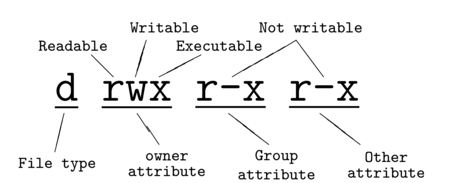
drwxr-xr-x, 共有檔案的 10 個屬性: